Overview: Target Manager
In this chapter, you will get to know how to create, search, and manage targets to organize your target library effectively.
Accessing Target Manager
In this section, you will get to know how to access the target manager module.
To access the target manager module, do the following:
-
Login to the platform.
-
Click the Data module and then click the Target Manager sub-module.
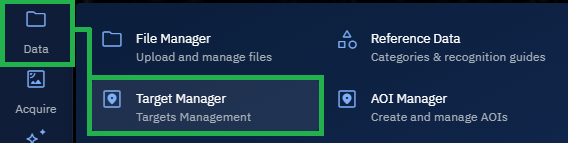
The Target Manager page is displayed.
Understanding Target & Area of Interest (AOI)
Analysts typically begin with an Area of Interest (AOI) to grasp the big picture. Once the big picture is completely grasped, then the analysts identify and monitor Targets or Point of Interests (POIs) within that area to enable actionable targeting, surveillance, or protection.
Target or Point of Interest (POI) refers to a single, strategically critical dot on the map. On the other hand, AOI represents a box or region drawn on the map to understand everything happening within it.
| Feature | Target | Area of Interest (AOI) |
|---|---|---|
| Definition | A specific, precise location or asset of strategic significance. | A broader geographic region identified for analysis or monitoring. |
| Spatial Scale | Single coordinate or very small feature (e.g., building, node, vehicle, vessel). | Large geographic extent (for example, city, region, maritime zone, operational theater). |
| Examples |
|
|
| Purpose | Focused on monitoring, securing, or targeting one specific asset or node. | Encompasses all relevant features, activities, and terrain in a region. |
| Use in Planning |
|
|
| Intelligence Tasks |
|
|
| Resolution Requirements | High-resolution, pinpoint accuracy. | Can use medium to low resolution over large areas. |
| Data Sources |
|
|
| Operational Impact | Enables precision targeting or protection of critical nodes and assets. | Supports broader operational decisions and resource allocation. |